 Swatch
✓ No ads · No tracking
Swatch
✓ No ads · No tracking
The clean color picker & eyedropper for Chrome.
Pick any color from any web page, copy its hex color code in one click, and build a color palette you'll actually use — with a live WCAG contrast checker built in. Manifest V3 native. Runs 100% locally.
// what you can do
One tool. Every color job.
Old color pickers got heavy and ad-ridden, or shrank into a bare eye dropper. Swatch keeps the whole flow — pick, copy, collect, check — in one clean popup.
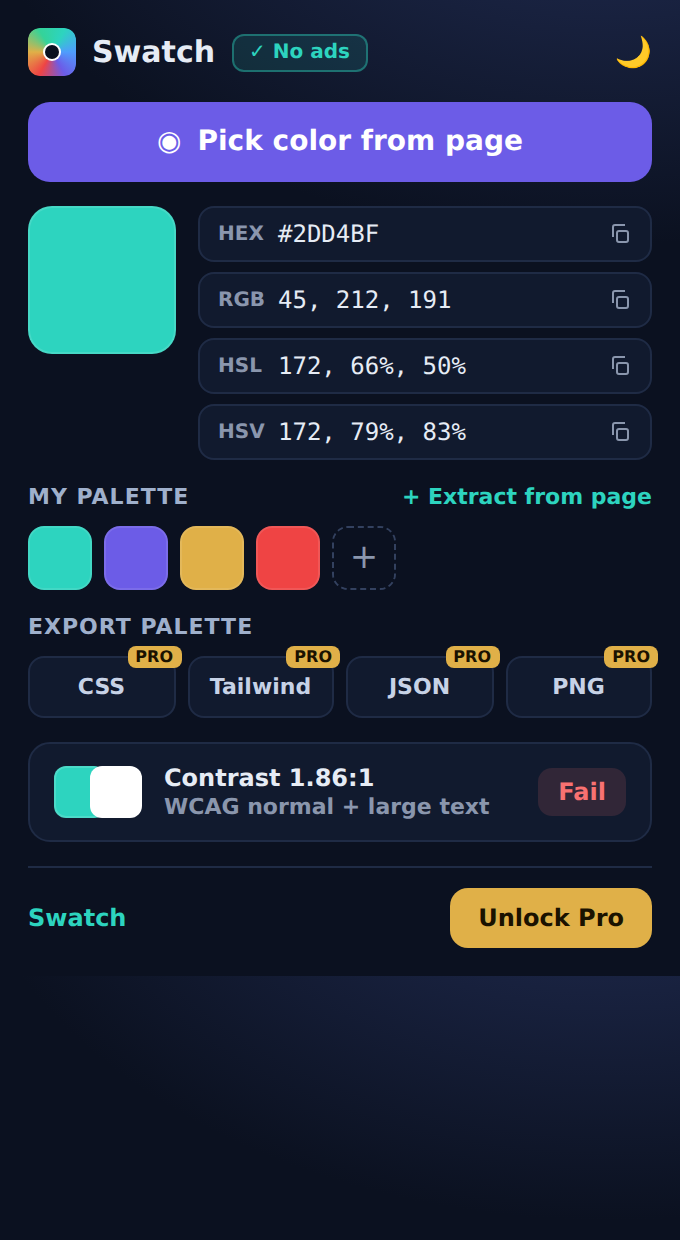
Native eyedropper
Pick color from screen with Chrome's built-in eye dropper API — pixel-perfect on any website, images and video included.
Copy hex code & every format
HEX, RGB, HSL and HSV, always in sync. One click copies any CSS color value to your clipboard.
My palette
Save picks into a personal color palette. It's still there next time you open the popup.
WCAG contrast checker
Accessibility ratio graded AA / AAA / Fail, live as you pick. No separate color contrast tool needed.
Private by design
Runs 100% locally in your browser. No ads, no tracking, no analytics — nothing ever leaves your device.
Light & dark themes
Two clean looks, one tap apart. Your choice is remembered.
Export palette to CSS variables, Tailwind config, JSON or a PNG swatch sheet · Extract colors from any website in one click · Unlimited palette · Contrast between any two colors. All of it, in the free version.
// faq
Questions, answered.
How do I pick a color from a web page in Chrome?
Install Swatch, open the popup and press “Pick color from page”. The native Chrome eyedropper lets you pick any color from any pixel — images and video included. The hex code is copied automatically.
Can I copy the hex color code of a color I picked?
Yes. Every picked color is shown as HEX, RGB, HSL and HSV. Click any format row to copy that CSS color value in one click.
Does Swatch include a WCAG color contrast checker?
Yes — Swatch shows the WCAG contrast ratio of your color live as you pick, graded AA, AAA or Fail for normal and large text.
Is Swatch free and private?
The core is free forever: eyedropper, all color formats, palette and WCAG contrast. Swatch runs 100% locally — no ads, no tracking, no analytics. See the privacy policy.
Can Swatch extract a color palette from a website?
“Extract colors from any website” in one click is coming in Swatch Pro — together with palette export to CSS variables, Tailwind config, JSON and PNG, and unlimited palettes.